Hi, My Name is

Micke Sarro

I’m a Master’s student at the University Of Turku with a strong interest in cybersecurity, drones, software development and artificial intelligence. I’m a motivated learner that likes to build things and take on new challenges.

In my free time I like flying and building small FPV quadcopters, but I’m also interested in the security aspect of drones and their future applications. I am also passionate about cybersecurity with a particular interest in penetration testing and reverse engineering. I’m currently looking for opportunities in these areas, but I’m also open to any other roles where my skills could be fitting.

I can be reached through Email at: [email protected]


Projects

Movement Shooter

C#Game Development
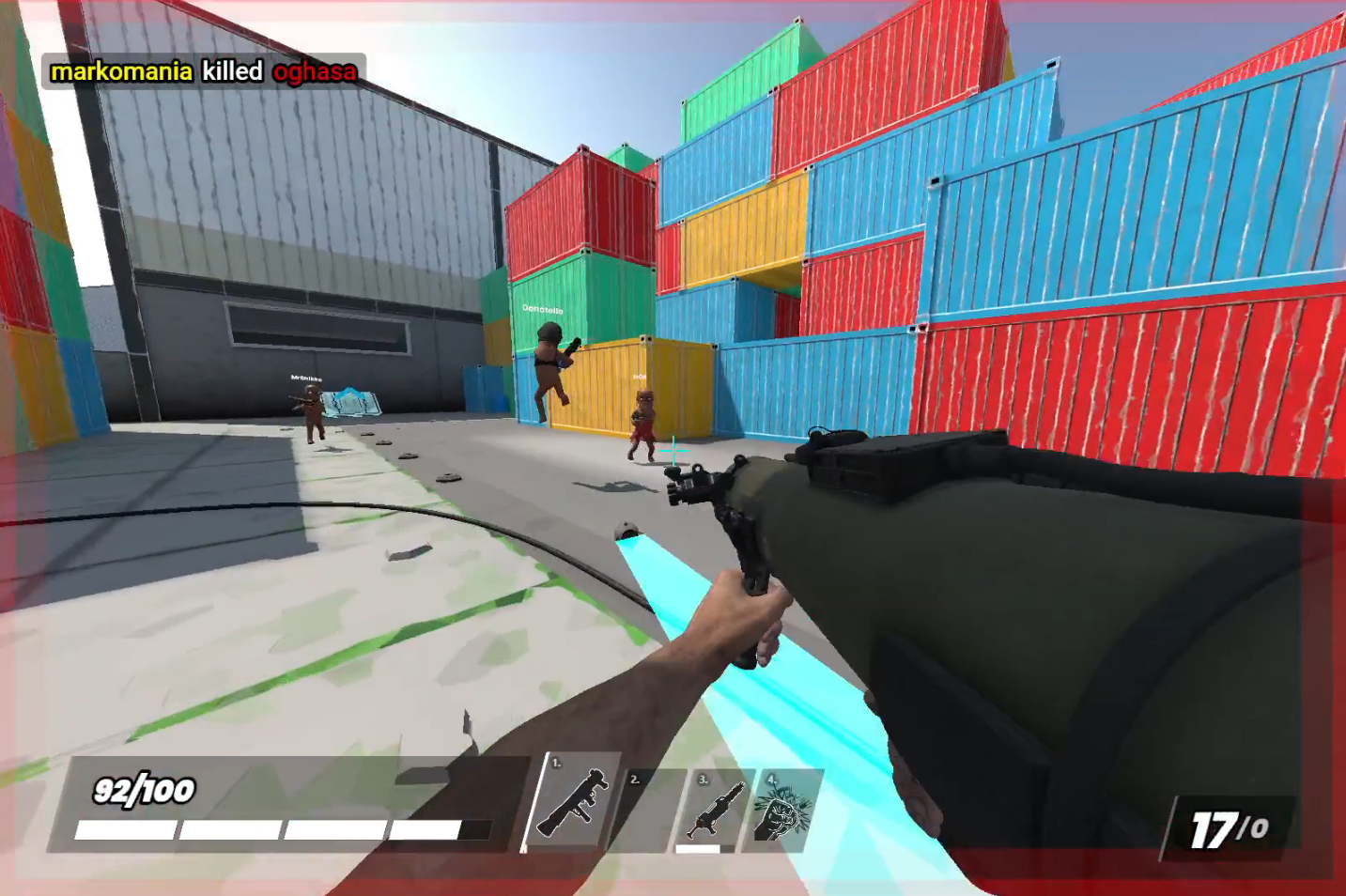
Movement Shooter

Multiplayer FPS shooter made with S&box. A Work in Progress multiplayer game that we've been developing as a 4 person team.
“A movement shooter”

The game is built with Facepunch’s S&box game engine/development framework.

What is the goal of our game?​

  • First person movement shooter​
  • Fun and intuitive movement​
  • Features like bhopping​
  • Multiplayer​
  • Simple player animations & Maps

What can the player do?​

  • Use weapons​
    • Railgun​
    • Rockets​
      • Rocket jump​
  • Railgun ammo is generated by hitting targets​
  • Game modes:​
    • DM (main focus)​
    • Other modes if feasible​

What does the player see/hear?​

Representation: 3D ​
Art style: Stylized?​

See:​

  • Terrain​
  • Other players​
  • Bots (?)​
  • 1st person viewmodel​

Hear:​

  • Player movement​
  • Shooting​
  • Background music or other ambient sounds (?)​
  • Various other SFXs

Attribution

This project uses the “Sauce-Movement-Base” by SmileCorp, licensed under the Creative Commons Attribution 4.0 International License.
Original code available at: https://github.com/smilefordiscord/Sauce-Movement-Base.git

License for that is in this file.

Stream Deck Project

PythonFlask
Stream Deck Project

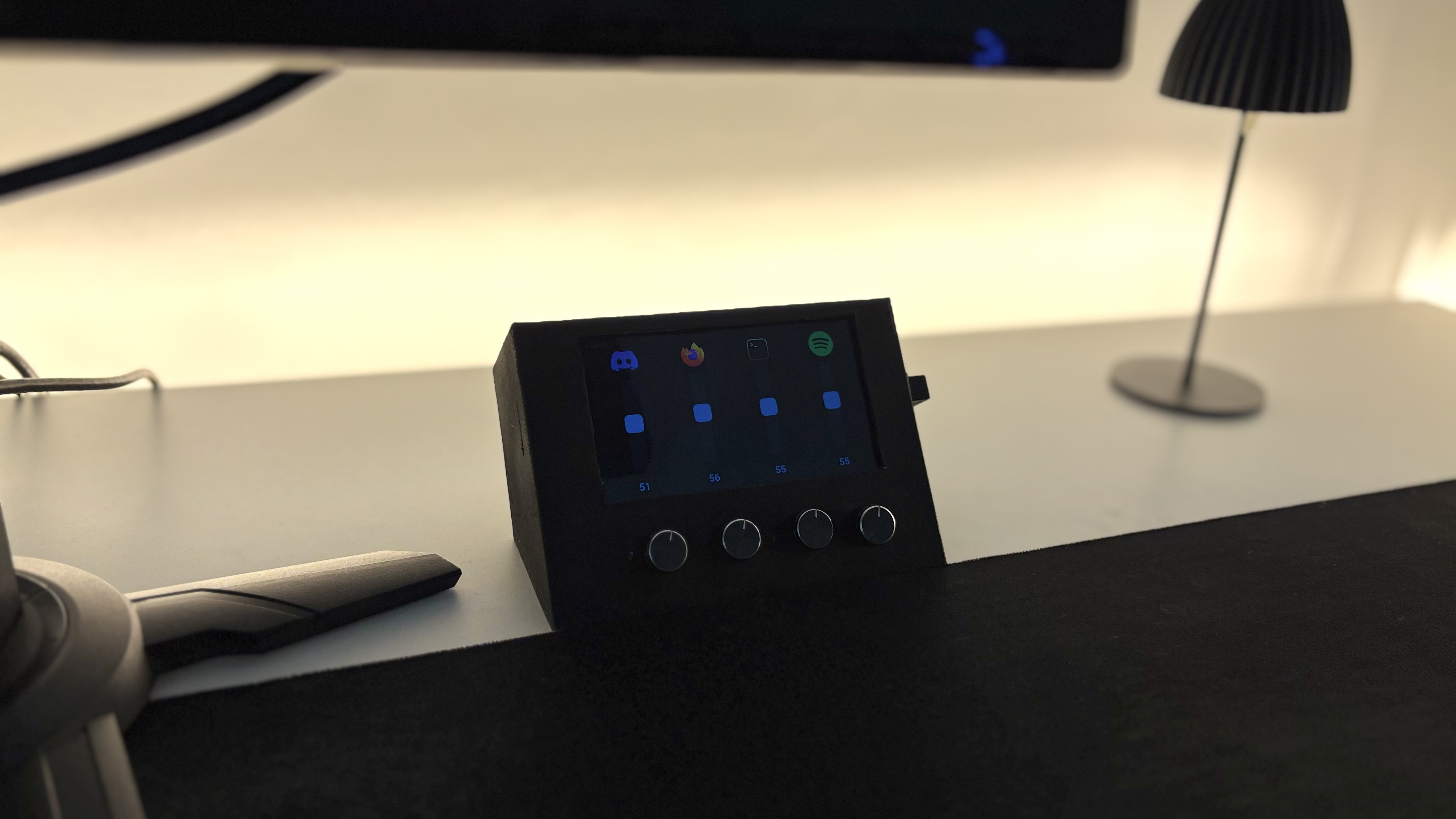
Custom-built touchscreen Stream Deck paired with a physical audio mixer. It uses a repurposed rooted Samsung Galaxy S3 as the touchscreen interface, while the physical hardware mixer runs on the deej software using an Arduino Nano with four potentiometers.

Custom Stream Deck & Hardware Mixer

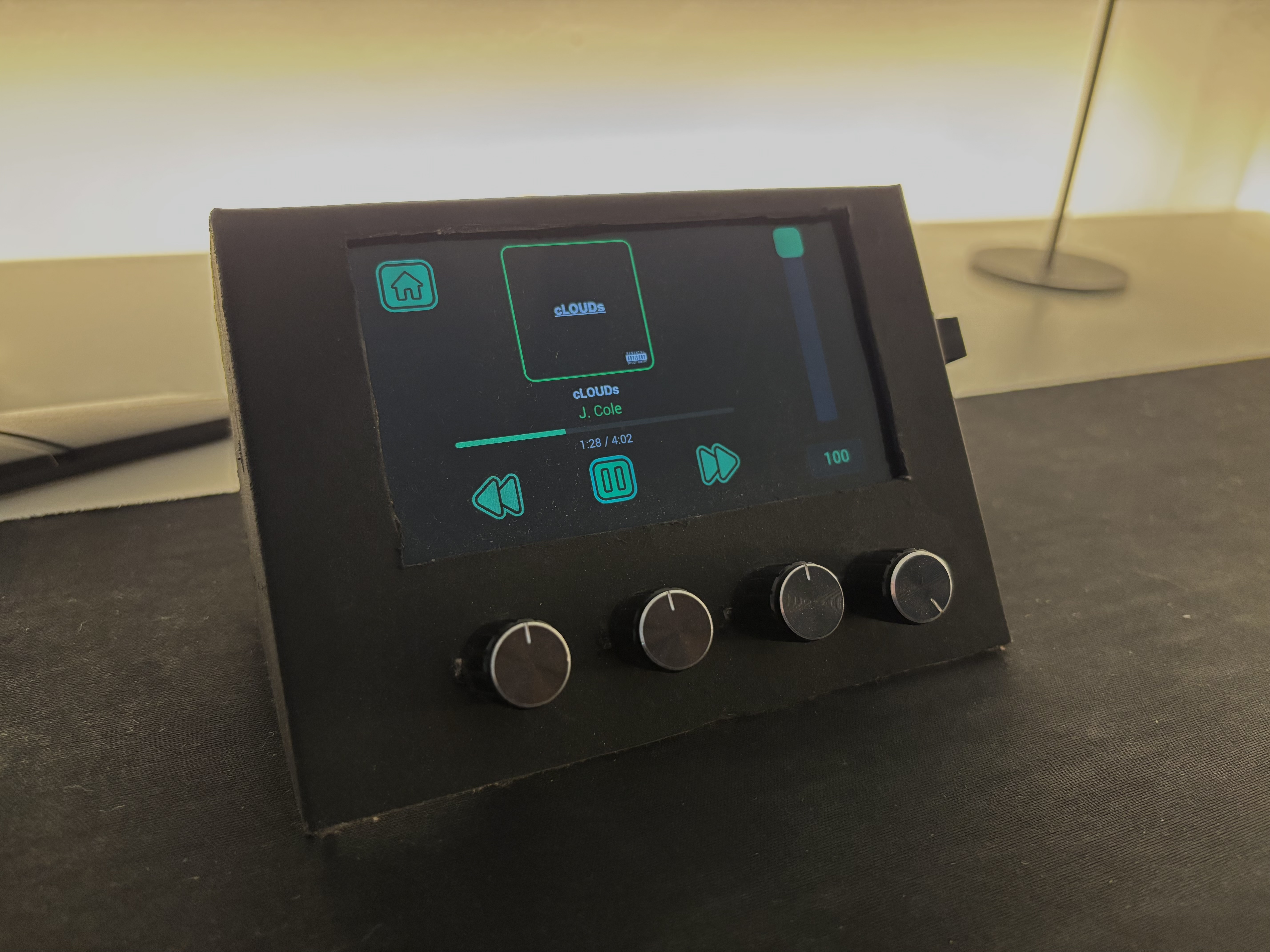
Custom-built touchscreen “Stream Deck” paired with a physical audio mixer. It uses a repurposed rooted Samsung Galaxy S3 as the touchscreen interface, while the physical hardware mixer runs on the deej software using an Arduino Nano with four potentiometers.

Features

  • App-Specific Volume Mixing: Four physical knobs let you independently control the volume of specific applications (like Discord, Firefox, and Spotify).

  • Visual Mixer Display: The Galaxy S3 screen shows which app is mapped to which knob, featuring live volume sliders and percentages.

  • Spotify Dashboard: A dedicated media screen pulls live data from Spotify, displaying the track name, artist, album art, and a live progress bar.

  • Touchscreen Controls: On-screen buttons allow you to quickly manage media (Play/Pause, Rewind, Skip) or execute quick actions like deafening Discord or switching audio outputs.
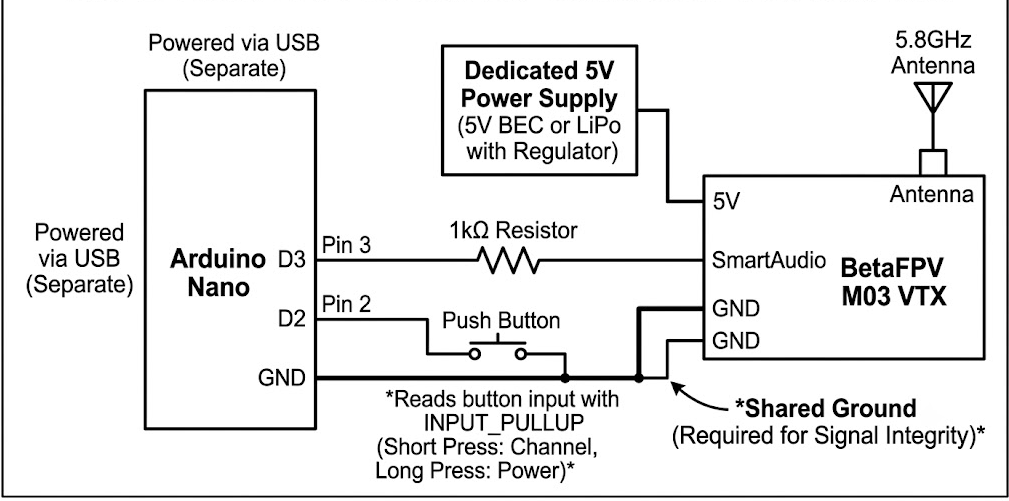
Arduino Nano to VTX Wiring Diagram


How It Works

  • At bootup the MixerApp.exe launches in the background. Background threads start and monitor the PC’s active applications, volume levels, and Spotify status.

  • Once the Galaxy S3 is plugged in via USB, the bundled Android Debug Bridge (adb.exe) detects it.

  • The script uses ADB to automatically set up port forwarding or USB tethering, creating a private network bridge between the PC and the phone.

  • After the bridge is established, the Flask app starts hosting the local web app.

The Display

  • The S3’s web browser navigates to the local IP address where Flask serves up the HTML, CSS, and JavaScript interface.

  • The host PC provides the data in JSON format, where the phone reads it to make changes like move the volume sliders, update the song title, or change the album art.

Actions

  • For media and especially Spotify data, Windows’ media session API is used to pull the info. This info is then cached in audio_manager.py to avoid unnecessary requests.

  • Audio actions are handled using nircmd.exe to talk to the Windows Control Panel.

  • Other actions like Discord are handled using keyboard shortcuts.

Showcase

The physical mixer and the smartphone are fitted into a cardboard box that’s painted black :D. A 3D printed case would be the next addition to have a more finalized look. Other future additions would include a simple function to easily add/remove buttons and actions into the mixer.
Arduino Analog VTX Interferer

ArduinoSmart Audio
Arduino Analog VTX Interferer

DIY SmartAudio VTX Controller

DIY SmartAudio VTX Controller

A small Arduino-based controller that talks to an analog FPV video transmitter over the SmartAudio protocol — letting you set channel, output power, and pit mode without a flight controller.

Built and tested with:

  • Arduino Nano
  • BetaFPV M03 analog VTX (25–350mW, 5.8GHz)
  • A single push button for on-the-fly channel and power control

Hardware

Component Role
Arduino Nano Runs the SmartAudio packet engine, reads the button, drives the VTX
BetaFPV M03 VTX + Antenna Analog 5.8GHz video transmitter, controlled over SmartAudio
Push button Short press = change channel, long press (1s+) = cycle power level
Split-rail 5V power Arduino gets power from USB-C connected to computer. VTX gets power separately from a powerbank or from a standard charger to handle the RF amplifier’s current draw, sharing a common ground with the Arduino for signal integrity

Wiring

Below is the full wiring diagram:

Arduino Nano to VTX Wiring Diagram

Through trial and error I figured the 1kΩ resistor is important, since SmartAudio is a shared, half-duplex, single-wire bus. Without it, the Arduino and VTX briefly driving the line at the same time can cause contention and corrupted commands.


Usage

  1. Wire the Nano to the VTX as described above, sharing ground.
  2. Flash vtx_controller.ino via the Arduino IDE.
  3. Plugging power should immediately start broadcasting on the configured startup channel.
  4. Short-press the button to step through channels; long-press to cycle power levels.
  5. Opening the Serial Monitor at 115200 baud shows what’s being sent.

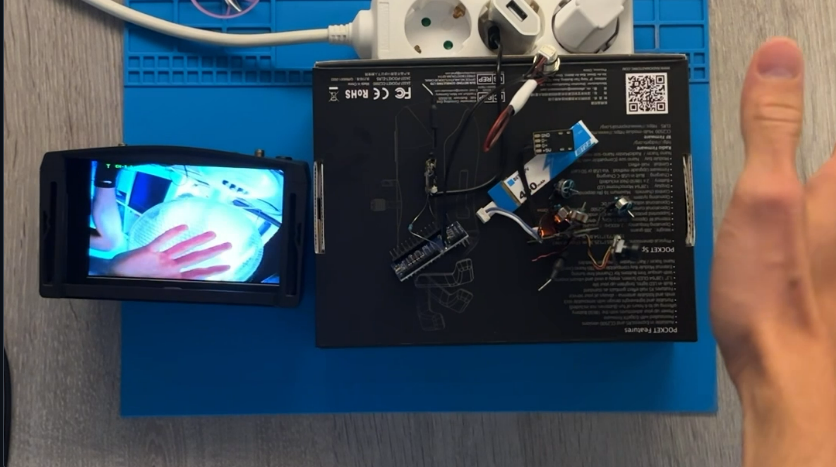
Clear video feed from another VTX transmitting a signal

Powering up the arduino VTX and toggling through to the same channel (RACEBAND CH-5) shows clear interference

Troubleshooting & End results

  • VTX resets to pit mode every power cycle: There were a lot of problems of settings not persisting over power cycles. This is most likely due to these cheaper VTX modules re-sending the config every boot.
  • Flickering / intermittent signal: There were also problems with the signal being weak or flickering, probably due to noise on the SmartAudio line. The VTX was also running hot during a lot of testing and at the end it might’ve burnt. This meant that I was unable to get a completely working version.
  • Next steps: Following steps in the project could be adding a receiver so the controller can scan for active signals first, then automatically setting the VTX to match it. This would work rather than manually checking every band and channel. This could be done by using the automatic search logic from the goggles for searching the strongest signal.

PythonIoTMiddlewareMulti-ProtocolMQTTCoAPFlaskThingsBoard
IoT Platform

Lightweight MultiProtocol IoT Platform

Lightweight Multi-Protocol IoT Platform

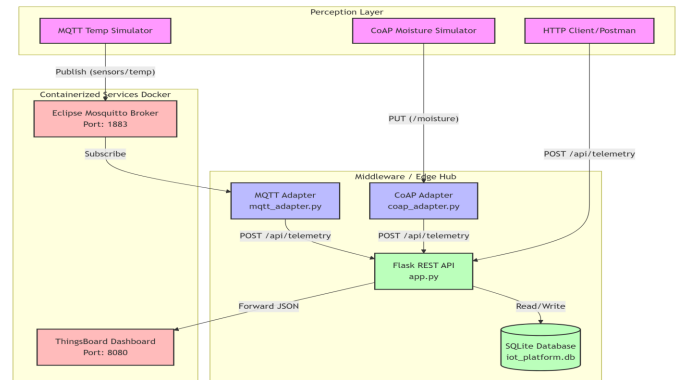
A lightweight IoT middleware that bridges physical edge devices and cloud-based visualization platforms. This platform handles device registration, local data ingestion, persistent storage, and data forwarding, while supporting multiple application-level protocols simultaneously (HTTP, MQTT, and CoAP).

Features

  • Multi-Protocol Support: Handles HTTP, MQTT, and CoAP telemetry simultaneously.
  • Decoupled Architecture: Standalone protocol adapters prevent blocking issues within the central API.
  • Local Storage: Edge persistence using a lightweight SQLite database.
  • Dashboard Integration: Automated data forwarding to a containerized ThingsBoard instance.

Prerequisites

  • Docker & Docker Compose
  • Python 3.x

Installation & Setup

  1. Start Containerized Services (Mosquitto & ThingsBoard):
docker-compose up -d

(Note: This maps Mosquitto to port 1883 and the ThingsBoard UI to port 8080).

  1. Set up the Python Environment:
python3 -m venv venv
source venv/bin/activate
pip install Flask requests paho-mqtt aiocoap
  1. Initialize the Database:
python3 init_db.py

Running the Platform

Because of the decoupled architecture, the core API and the protocol adapters must be started in separate terminal windows (with the virtual environment activated in each):

  1. Start the core REST API:
python3 app.py
  1. Start the MQTT Adapter:
python3 mqtt_adapter.py
  1. Start the CoAP Adapter:
python3 coap_adapter.py

Testing / Simulating Data

  1. Register a Device: Before sending data, register a device to map it to a ThingsBoard token.
curl -X POST http://127.0.0.1:5000/api/register \
     -H "Content-Type: application/json" \
     -d '{"name": "TempSensor_1", "protocol": "MQTT", "tb_token": "YOUR_SECRET_TOKEN"}'
  1. Run Simulators: Update the DEVICE_ID variable in the simulator files to match the ID returned from your device registration, then run:
python3 simulators/mqtt_temp_sim.py

or for CoAP:

python3 simulators/coap_moist_sim.py
  1. Verify Data: You can view local historical telemetry by calling the API:
curl -X GET http://localhost:5000/api/data/<device_id>

Or visit http://127.0.0.1:8080 to see the live data in your ThingsBoard dashboard.

Thesis

Älykkäisiin sähköverkkoihin kohdistuvat kyberuhat ja niiden torjuminen

  • LaTeX
  • Smart Grids
  • Academic Writing
  • Research

TURUN YLIOPISTO

Tietotekniikan laitos

Micke Sarro: Älykkäisiin sähköverkkoihin kohdistuvat kyberuhat ja niiden torjuminen

TkK-tutkielma, 23 s.

Tietotekniikka

Toukokuu 2025

Abstrakti

Älykkäät sähköverkot ovat moderni infrastruktuuriratkaisu, jossa sähkön tuotannon, jakelun ja kulutuksen hallitsemiseksi hyödynnetään kaksisuuntaisia digi- ja viestintä- teknologioita. Näiden järjestelmien keskeisiä etuja ovat energian tehokkaampi käyt- tö, verkon parempi toimintavarmuus sekä mahdollisuus integroida uusiutuvia ener- gianlähteitä osaksi sähköntuotantoa. Samalla näiden järjestelmien vahva riippuvuus tieto- ja viestintäverkoista altistaa ne monenlaisille kyberuhille. Tässä tutkielmassa tarkastellaan älykkäisiin sähköverkkoihin kohdistuvia kyberuh- kia ja keinoja niiden torjumiseksi. Työssä kartoitetaan keskeisimpiä hyökkäysvek- toreita, kuten palvelunestohyökkäyksiä, haittaohjelmia, tiedon manipulointia ja si- säpiiririskejä, sekä analysoidaan niiden mahdollisia yhteiskunnallisia vaikutuksia. Lisäksi työssä perehdytään nykyisiin kyberturvallisuuden arviointi- ja torjuntame- netelmiin, kuten tunkeutumisen havaitsemisjärjestelmiin, tekoälypohjaisiin analyy- simenetelmiin sekä turvallisuusarkkitehtuurien kehityssuuntiin. Tutkielma korostaa, että älyverkkojen kyberturvallisuus on moniulotteinen ilmiö, jo- ka vaatii teknisten ratkaisujen lisäksi myös organisatorista ja inhimillistä huomiota. Kattava kyberturvallisuus edellyttää riskien tunnistamista, ennakoivaa suojautumis- ta ja jatkuvaa sopeutumiskykyä kehittyvään uhkaympäristöön. Lopuksi työ tuo esiin kyberturvallisuuden keskeisen roolin yhteiskunnan toimivuuden ja huoltovarmuuden turvaamisessa. Asiasanat: älykkäät sähköverkot, kriittinen infrastruktuuri, kyberturvallisuus

View Full Thesis on UTUPub